Why are marketing teams shifting their entire budgets toward video-first landing pages? The answer lies in the intersection of human psychology and search engine algorithms.
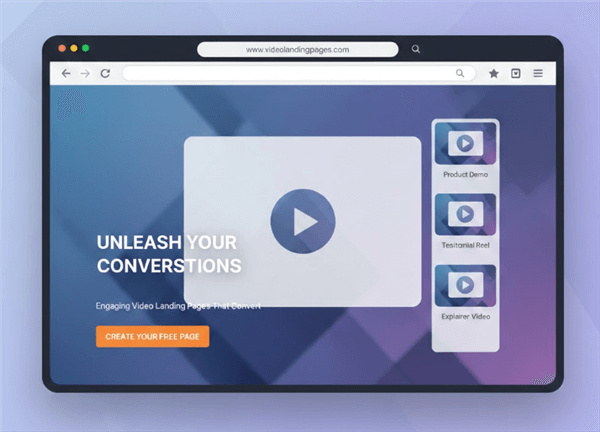
Reason 1. Increase Conversions with Video Landing Pages
Data from the past decade has consistently shown that adding a video to a landing page can increase conversions by up to 80%. Why? Because video reduces the "cognitive load" for the user. Instead of forcing a visitor to read through paragraphs of technical jargon to understand how your SaaS works, a 60-second video shows them the solution in action. It transforms abstract promises into tangible reality.
Reason 2. Improve Search Rankings and Engagement
Google’s algorithms have shifted to prioritize "User Intent" and "Engagement."
- Dwell Time: When a user clicks your link and stays for two minutes to watch a video, it sends a powerful signal to Google that your page is relevant and high-quality. This "dwell time" is a massive ranking factor.
- Video Snippets: Pages with properly optimized video content are eligible for Video Rich Snippets in Search Engine Results Pages (SERPs). These thumbnails significantly increase your Click-Through Rate (CTR) compared to plain text links.
Reason 3. Build Trust with SaaS Visitors
In a world saturated with AI-generated text, video provides authenticity. Seeing a product’s UI in motion or hearing a founder’s voice builds a level of trust that static images simply cannot replicate. For B2B SaaS, where the sales cycle can be long, establishing this trust early in the "Awareness" stage is critical.
How to Choose the Right Video Type for Your Landing Page
Not all videos are created equal. To maximize ROI, you must match the video type to the specific intent of your landing page.
Explainer Video (The “What Is It?”)
Best for: Top-of-funnel (ToFu) landing pages and homepages.
An explainer video is designed to orient new visitors quickly. Its goal is to clearly frame the problem your audience faces and, at a high level, show how your product solves it. These videos typically avoid technical depth and instead focus on outcomes, benefits, and the “why” behind the product.
Style: Often animated or simplified live-action. The emphasis is on clarity and storytelling rather than step-by-step instructions.
Product Demo Video (The “How Does It Work?”)
Best for: Mid-funnel (MoFu) pages, feature pages, and Product Hunt launches.
A product demo shows the actual software in use, helping prospects understand how the product works in real scenarios. This is where functionality matters—viewers want to see workflows, interactions, and results, not just promises.
Best practice: Highlight only the most valuable actions on screen. Features like auto-zoom or guided focus help draw attention to key UI elements and prevent viewers from feeling overwhelmed by complex dashboards.
Customer Testimonial Video (The “Who Else Uses It?”)
Best for: Bottom-of-funnel (BoFu) pages and pricing pages.
Testimonial videos use social proof to reduce risk and overcome final objections. Hearing real customers describe their success builds trust and validates your product’s claims far more effectively than marketing copy alone.
Style: Authenticity matters more than production quality. Simple, lo-fi videos recorded on smartphones often feel more genuine and trustworthy than heavily polished content.
Hero or Background Video (The “Vibe”)
Best for: Brand-driven or design-focused pages.
Hero and background videos exist to set mood, tone, and visual rhythm—not to educate. They help establish credibility and professionalism while creating an emotional first impression.
Important note: These videos should always play muted and should never contain essential information, as users focused on finding answers will typically ignore them.
How to create a landing page video with Poindeo
Having the strategy is one thing; executing it without a Hollywood budget or a month-long production timeline is another. This is where Poindeo becomes the cornerstone of your video landing page workflow.
What Is Poindeo?
Poindeo is a browser-based video creation tool designed to turn your screen recording and static assets—like screenshots, images, and PDFs—into dynamic, professional-grade videos. Unlike traditional video editors that involve complex timelines and steep learning curves, Poindeo is built for speed and clarity. It is the ideal solution for indie developers, marketers, and SaaS founders who need to showcase their products without the overhead of learning professional editing suites.
Why Poindeo is Built for Landing Pages
Most video tools focus on "recording." Poindeo focuses on "transforming." Landing pages often require highly specific, polished visuals of a product's UI. Poindeo allows you to take existing screenshots or PDFs and turn them into a "guided story."
- Smart Zoom Effects: This is the signature feature. By simply clicking an area on your media, Poindeo creates an automatic zoom-in effect. On a landing page, this is vital for directing a visitor's eye to exactly where the value happens in your software.
- Static-to-Dynamic Animation: You can upload images, screenshots, or PDFs and instantly animate them. This is perfect for "Explainer" or "Step-by-Step" sections where a full screen recording might feel too cluttered.
- Multi-source Recording: Capture your webcam and screen simultaneously to add a "human face" to your landing page, instantly building trust with "cold" traffic.
- Automatic AI Captions: Since most landing page viewers watch on mute, Poindeo’s speech-to-text captions ensure your message is communicated even without sound.
- Built-In Narration: You can record audio directly for your assets, ensuring the pacing and tone perfectly match your landing page's branding.
- Browser-Based Convenience: Because it works entirely in your browser, you can iterate and update your landing page videos in minutes—crucial for testing different hooks or feature focuses.
Step-by-Step: Creating Your Landing Page Video with Poindeo
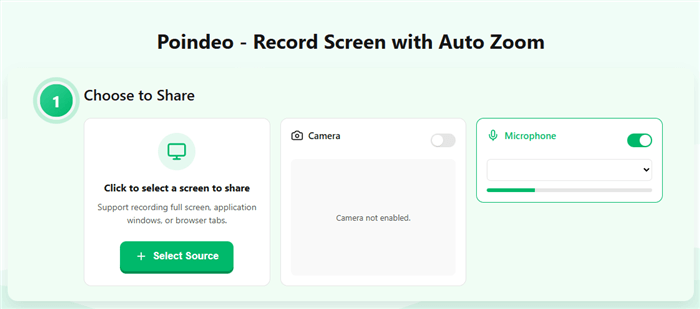
Step 1: Upload Your Assets or Record Your Screen.
Start by uploading high-resolution screenshots of your product’s most impressive features or a PDF of your workflow. Alternatively, use the built-in recorder to capture a quick walkthrough of your UI.
Step 2: Apply Smart Zooms.
Identify the 3-4 "A-ha!" moments in your product. Click those areas in the Poindeo editor. The tool will automatically create smooth, professional zooms that guide the viewer through the process. No manual keyframing required.
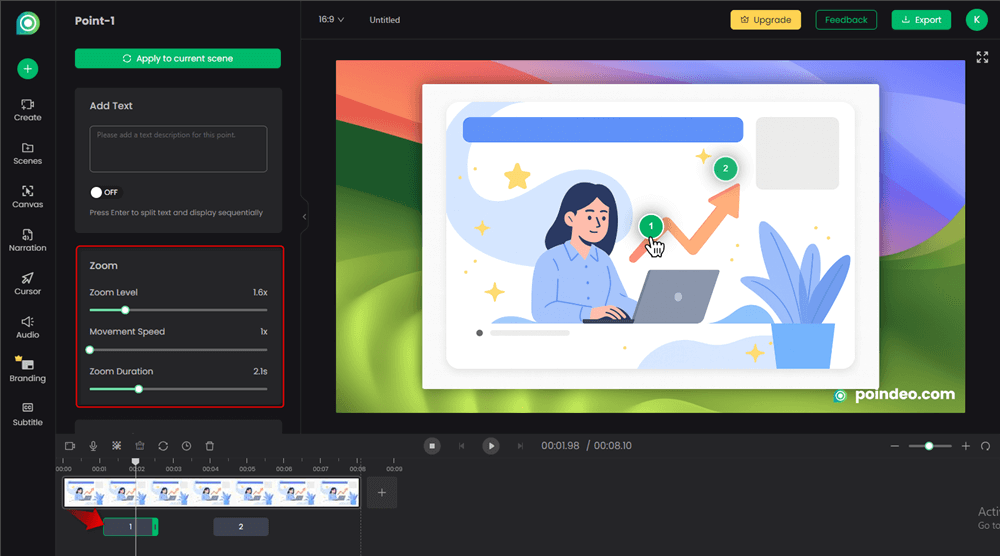
Step 3: Add Text Annotations & Narration.
Clarity is key for conversions. Add labels or callouts to your zoomed areas to explain what the user is seeing. Record a 30-60 second narration explaining the benefit of the feature, keeping the tone helpful and concise.
Step 4: Generate AI Captions & Background Music.
Enable automatic captions to ensure accessibility and "silent viewing" optimization. Add a subtle background track from Poindeo’s library to give the video a polished, high-energy feel that keeps users engaged.
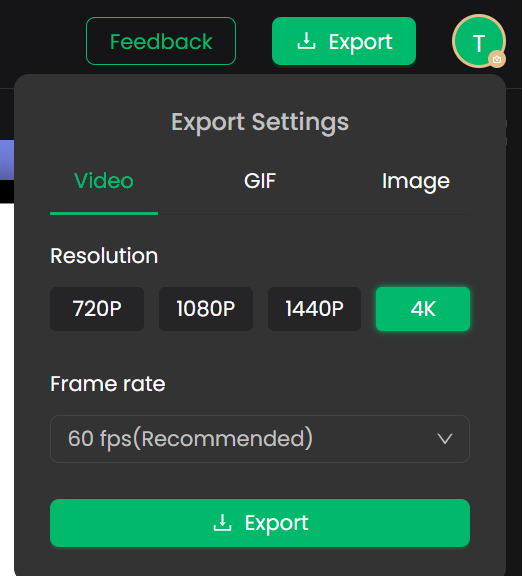
Step 5: Export for Your Platform.
Landing pages aren't just for desktop. Use Poindeo’s export options to create a 16:9 version for your hero section and a 9:16 or 1:1 version for mobile-optimized landing pages or social media ad mirrors.
Also Read: The Ultimate SaaS Demo Guide >
Your Landing Page Video Creation Toolbox (Low Effort, High Impact)
You don't need a Hollywood budget to create a 2026-ready video landing page. The "DIY" aesthetic is often more effective for SaaS because it feels transparent and real.
| Tool Category | Recommended Software | Why We Like It |
| Creation/Editing | Poindeo | Perfect for "Auto-zoom" demos and UI-focused SaaS clips. |
| Hosting | Wistia | Best-in-class video discoverability and lead-capture forms inside the player. |
| Captions | Descript | AI-powered transcription that makes editing video as easy as editing a Doc. |
When editing, remember that many viewers will be in "Silent Mode."
- Use large text overlays for key points.
- Use visual cues like arrows or highlights to direct the eye.
- Ensure your brand colors are consistent throughout the video.
Conclusion
As we move deeper into 2026, the gap between "Winners" and "Losers" in the SaaS space will be defined by their ability to communicate value quickly and visually. A Video Landing Page is no longer a luxury—it is the standard.
Don't overthink it. Take your top-performing landing page today, record a 60-second walkthrough of your most "A-ha!" feature, and place it at the top. The data will speak for itself.
FAQs: Video Landing Page Strategy
Why Are Feature-List Landing Pages No Longer Enough in 2026?
In 2026, traditional feature-list landing pages no longer match how SaaS buyers evaluate products.
User attention spans are shorter, and visitors expect immediate, visual proof of value. Static screenshots and copy require too much interpretation, which slows decision-making and increases drop-off.
Video landing pages solve this by showing the product in action. They reduce cognitive load, build trust faster, and help move visitors from curiosity to confident conversion, making video a core element of modern CRO rather than an optional add-on.
Does a video landing page slow down my site?
If implemented incorrectly, yes. Large, self-hosted video files can significantly hurt your Core Web Vitals. However, by using a dedicated hosting provider (like Vimeo or Wistia) and implementing Lazy Loading, you can ensure that the video only loads when needed. This keeps your initial page load fast while providing high-quality content.
Should I use autoplay for my landing page video?
The industry standard for 2026 is Muted Autoplay. Browsers block autoplay with sound to protect user experience. By setting your video to play silently with high-contrast captions, you can capture the user's attention without being intrusive. Always provide a clear "Unmute" or "Play with Sound" button.
How long should a landing page video be?
For high-conversion landing pages, the "sweet spot" is between 45 and 90 seconds. You have roughly 10 seconds to hook the viewer, 30 seconds to show the core value, and 15 seconds for a strong Call to Action. If your product is complex, consider a short "hero" video at the top and a more detailed demo further down the page.
Can I make a professional video without a film crew?
Absolutely. Modern SaaS marketing favors authenticity over high production value. Tools like Poindeo allow you to create polished, professional videos using only screenshots, PDFs, or simple screen recordings. Features like Smart Zoom and AI Captions give your videos a "high-end" feel without the high-end price tag.
What is the best placement for a video on a landing page?
Always place your primary video "Above the Fold." This means it should be visible immediately when the page loads without the user having to scroll. Data shows that videos placed in the hero section have a significantly higher play rate and conversion impact than those placed further down.