You've finished developing the software; now the challenge is to find users. For developers and independent hackers, the pre-launch phase is frequently more daunting than the build itself. You know you should be marketing, but the advice you see online is frequently ambiguous ("just build an audience!") or unnecessarily complicated ("run a 3-tier Facebook ad campaign!").
When it comes to Product Hunt, the stakes are higher. It is the Super Bowl of independent software. A good launch can result in thousands of users, investor interest, and a significant MRR. An unsuccessful launch hides your product in the "Newest" tab, never to be seen again.
Here is the hard truth: Product Hunt is a visual medium. While your code matters, users see your product before they use it. Products with high-quality video demos and polished visual assets convert 20-30% higher than those with static screenshots.
This guide isn't just a marketing checklist. It is a 30-Day Visual Action Plan. We are going to bridge the gap between "coding the product" and "selling the product," using lean video strategies that don't require you to be a professional video editor.
The Strategy: "Visual-First" Building in Public
Most pre-launch guides fail because they treat marketing as a text-based activity. In 2025, audience building is video-based.
Our 30-day plan operates on a simple thesis: Show, don't just tell.
Instead of writing about your features, you will record them. Instead of begging for upvotes, you will share your journey visually. And you will do it using tools designed for speed, not complexity.
Let's break down your next 30 days.
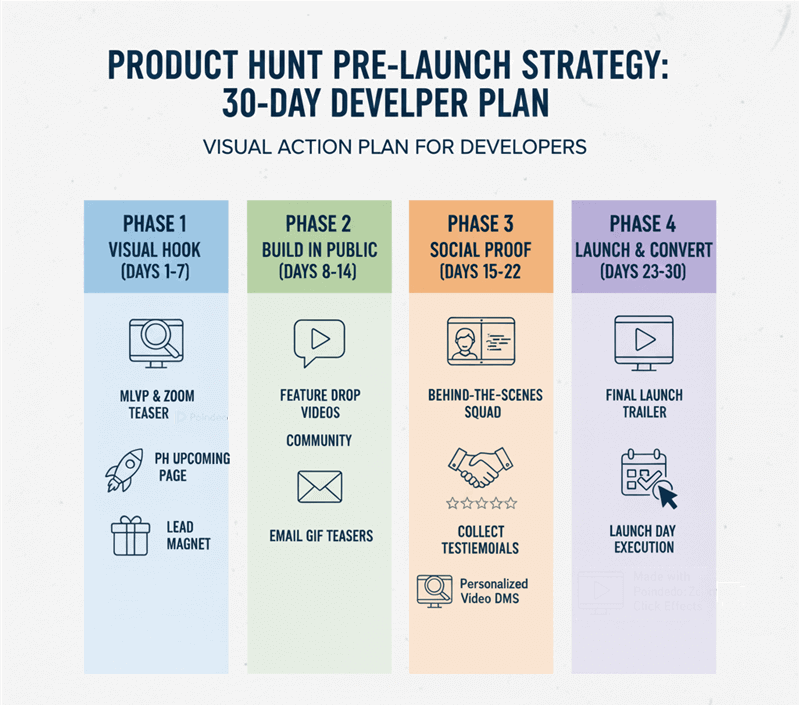
Phase 1: Foundations & The "Visual Hook" (Days 1–7)
Define your "Minimum Loveable Product" and create the core visual assets that stop the scroll.
Day 1-2: Define the MLVP (Minimum Loveable Product)
The concept of MVP (Minimum Viable Product) is dangerous for a launch. "Viable" means it works. "Loveable" means people want to share it.
Before you record a single frame of video, you must identify your Visual Hook. This is the one feature or workflow in your app that looks the most satisfying on screen.
- Is it a drag-and-drop interaction that feels buttery smooth?
- Is it a dark mode toggle that instantly transforms the UI?
- Is it a complex data set turning into a beautiful chart?
Pick this one feature. This will be the star of your Phase 1 content. You aren't selling the whole tool yet; you are selling this specific "moment of delight."
Day 3-5: Create the "Problem-Solution" Teaser (Vertical Video)
Vertical video (TikTok, Reels, YouTube Shorts) is currently the highest-reach format for organic growth. You need to create 2-3 short videos (15-30 seconds) that focus strictly on the pain point.
The Script Formula (Fill in the Blanks):
- The Hook (0-3s): "Stop [doing the annoying manual task]." (Visual: Screen recording of the slow, old way).
- The Agitation (3-10s): "It wastes hours of your time and breaks your flow."
- The Reveal (10-25s): "That’s why I built [Product Name]. Watch this." (Visual: The MLVP feature from Day 1).
- The CTA (25-30s): "Launching soon. Link in bio to get early access."
Day 6-7: The "Upcoming" Page & Lead Magnet
Product Hunt allows you to create a "Coming Soon" page (or "Teaser" page) before your official launch. This is critical for collecting emails.
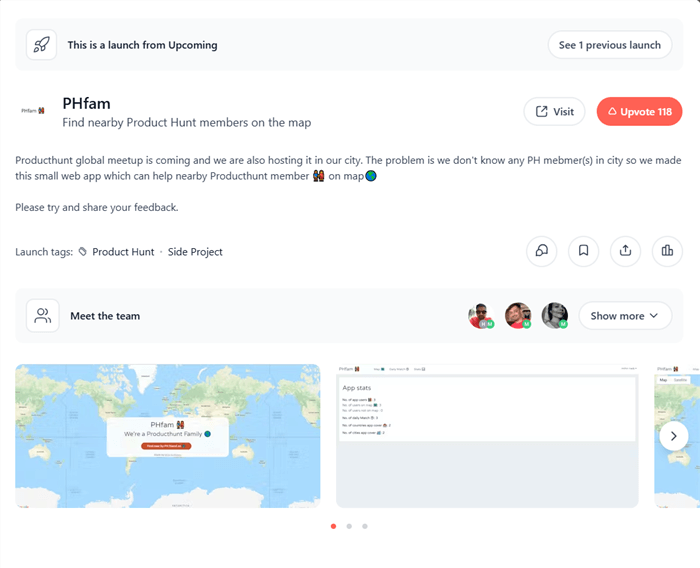
Requirements:
- Tagline: Keep it under 60 characters. Be descriptive, not clever. (e.g., "The Vercel for Video Editing" is better than "Edit faster").
- Visual Asset: You need a logo or product icon (240x240 JPG/GIF).
- The Lead Magnet: Why should people give you their email? "Updates" are boring. Offer value.
Phase 2: Distribution & "Building in Public" (Days 8–14)
Goal: Get eyes on your teasers, drive traffic to your Upcoming page, and start the "Build in Public" momentum.
Day 8-10: The "Feature Drop" Campaign
"Building in Public" is often misunderstood. It doesn't mean tweeting "I am coding today." It means showing the result of your coding.
For the next three days, execute a Feature Drop:
- Day 8: Post a raw video of a secondary feature. Caption: "Finally fixed the export bug. Look how fast this renders now."
- Day 9: Post a poll asking for UI feedback. "A or B for the dashboard layout? Help me decide."
- Day 10: Post a "Fail" video. Show something that broke. Developers respect authenticity.
Day 11-12: Community Outreach
Go to where your users hang out:
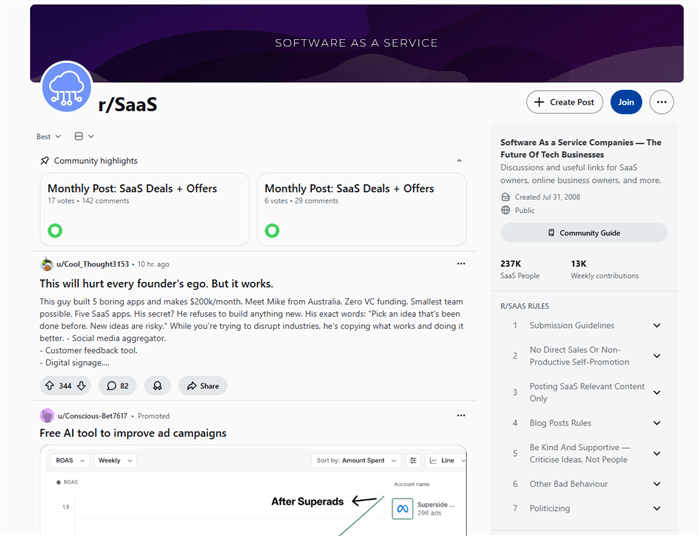
- Reddit: r/SideProject, r/SaaS, r/WebDev.
- IndieHackers: The "Milestones" section.
- Discord/Slack: Niche developer communities.
The Golden Rule: Do not post "Please sign up."
The Better Approach: Post your video from Day 3 and ask for a critique.
"Hey everyone, I'm building a tool to help devs edit videos. I made this teaser for my Product Hunt launch. Is the value prop clear? Be brutal."
This strategy (The "Helper" Strategy) disarms people. They watch the video to "critique" it, but end up interested in the product because the demo is compelling.
Day 13-14: The Email Welcome Sequence
You are now getting signups. Don't let them go cold. Draft a simple "Welcome" email.
The "Visual" Email Trick:
Embed a GIF of your product in the welcome email. Why? Click-through rates on emails with video/GIFs are significantly higher.
Phase 3: Deep Engagement & Social Proof (Days 15–22)
Goal: Prove the product works, establish authority, and recruit your "Launch Squad."
Day 15-17: The "Deep Dive" Content
Teasers are great, but now you need to show substance. Create a longer-form video (60-90 seconds) for YouTube or LinkedIn. This is a "Walkthrough" or "Behind the Scenes."
Content Idea: "How I built the [Feature Name] in 48 hours."
Walk through the code and the visual output. This establishes you as an authority and builds trust with developer audiences who are skeptical of "vaporware."
Day 18-20: Recruit the "Launch Squad" (Finding Hunters)
You need 20-50 people who will upvote and comment in the first hour of your launch. This velocity triggers the Product Hunt algorithm to feature you on the homepage.
The Outreach Strategy:
Identify people who engaged with your content in Phase 2.
- Go to their DM (Direct Message).
- Do not send a text template.
- Send a Personal Video.
"Hey [Name], I noticed you liked my post about the export feature last week. I'm launching next Tuesday and I'd love your support. Here is a quick sneak peek of the final version..."
A personalized video DM has a near 100% open rate compared to ignored text DMs. It shows you are a real human, not a bot.
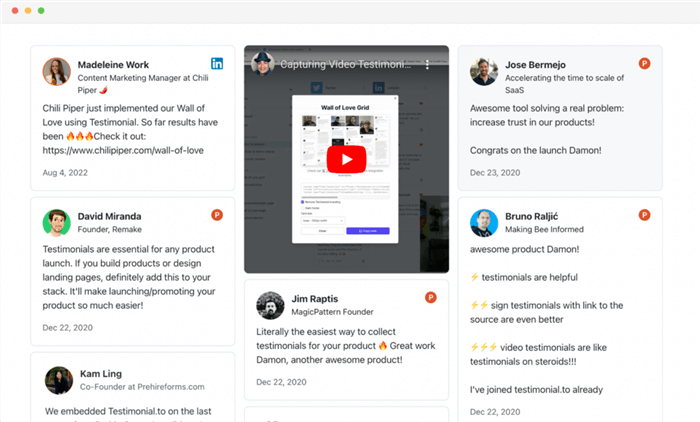
Day 21-22: Beta User Testimonials
Social proof is currency. If you have beta users, ask them for a quote.
- Best case: A video testimonial.
- Good case: A tweet you can screenshot.
- Minimum: A text quote you can put on a graphic.
Action: Assemble these testimonials into a "Wall of Love" image to use on your Product Hunt launch page gallery.
Phase 4: Pre-Launch Sales & Final Hype (Days 23–30)
Goal: Finalize the main sales asset (The Trailer) and execute the launch.
Day 23-25: The Official Product Hunt Demo Video
This is the most critical asset of your entire pre-launch cycle. When a user lands on your Product Hunt page, they will click "Play" on your demo video before reading the description. The quality and clarity of this video will directly determine your conversion rate.
The Anatomy of the Perfect Launch Trailer:
The structure must be tight and rapid-fire, designed to showcase value in under 60 seconds:
- The Hook (0-5s): Clearly state the problem your user faces.
- The Solution (5-15s): Quickly introduce your product as the answer.
- The Core Demo (15-45s): Fast-paced showing of features. Note: Viewers need to see exactly where you are clicking. Using automated tools to highlight actions is non-negotiable for clarity.
- Social Proof/Tech Specs (45-50s): "Trusted by 500+ devs" or "Built with React & Rust."
- Call to Action (50-60s): "Get the launch deal on Product Hunt."
The Efficiency Revolution: Making Professional Demos with Poindeo
Traditional video editors (like Premiere Pro) are overkill for developers. They introduce a steep learning curve and severely slow down asset production. You need a tool that turns a simple screen recording into a high-converting Product Hunt demo quickly and efficiently.
You might be thinking, "I don't have time to learn video editing keyframes just to make a zoom effect." You are right. That’s why you shouldn't use traditional editors.
Poindeo is specifically designed for developers, indie hackers, and SaaS founders, focusing on streamlining the "screen recording to product demo" workflow. It removes complex timeline editing to let you focus on what matters: clearly demonstrating your product's value.
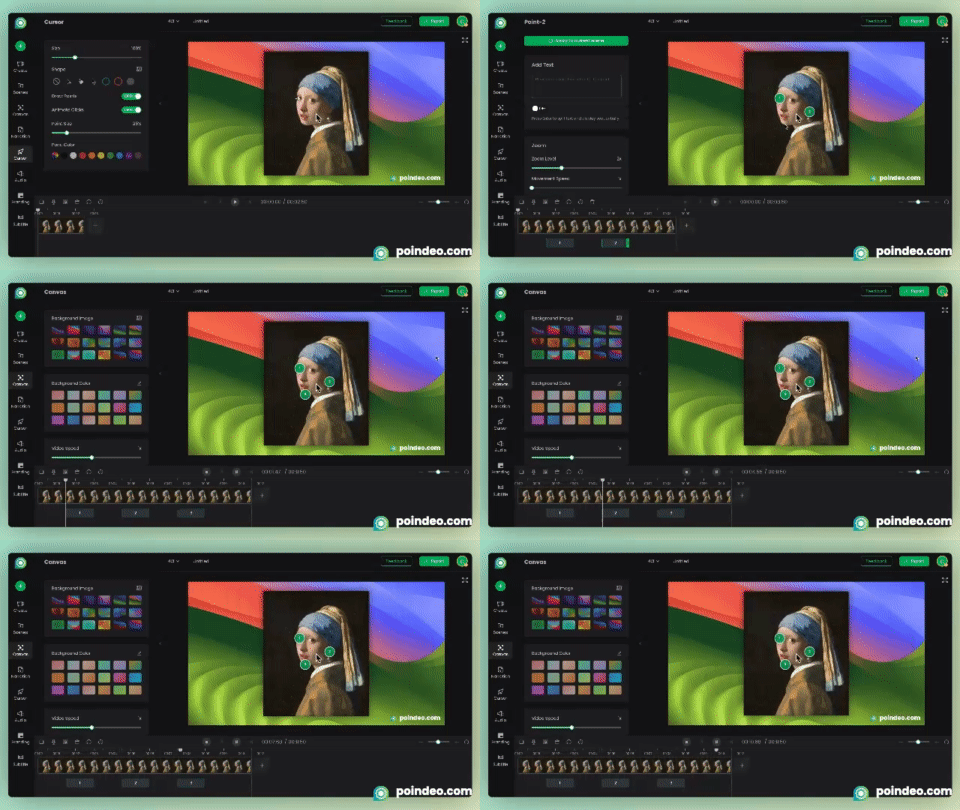
Poindeo’s core value lies in making complex visual clarity easy. Its key features include:
- Simultaneous Screen and Camera Recording: Easily capture your screen, your voice, and your webcam feed at the same time. This is perfect for creating engaging, personal founder messages and tutorials where your face-to-camera presence builds trust.
- Intuitive Zoom and Focus: Instantly zoom in on specific UI elements or code snippets to guide the viewer’s attention and prevent them from missing crucial details. This "Zoom-in" technique is the secret weapon of top Product Hunt launches—it forces the viewer to look exactly where you want them to look.
- Professional Backgrounds & Framing: Easily add branded backgrounds, device frames, or padding to your raw screen recordings, boosting your demo's perceived production quality.
- Fast Export: Optimized export settings for web and social media, ensuring your final video is ready for YouTube and quick to upload.
- GIF Export for Emails & Lightweight Sharing: Convert short clips into lightweight, high-quality GIFs—perfect for email sequences, launch announcements, or quick visual previews where video playback is not ideal.
High-Efficiency Steps for Your Launch Trailer (Day 24-25):
Here is the process to quickly deliver a high-impact demo, leveraging Poindeo's features:
Step 1: Capture and Structure (Day 24 AM)
Segmented Recording: Record your product's key flows based on the Launch Trailer structure.
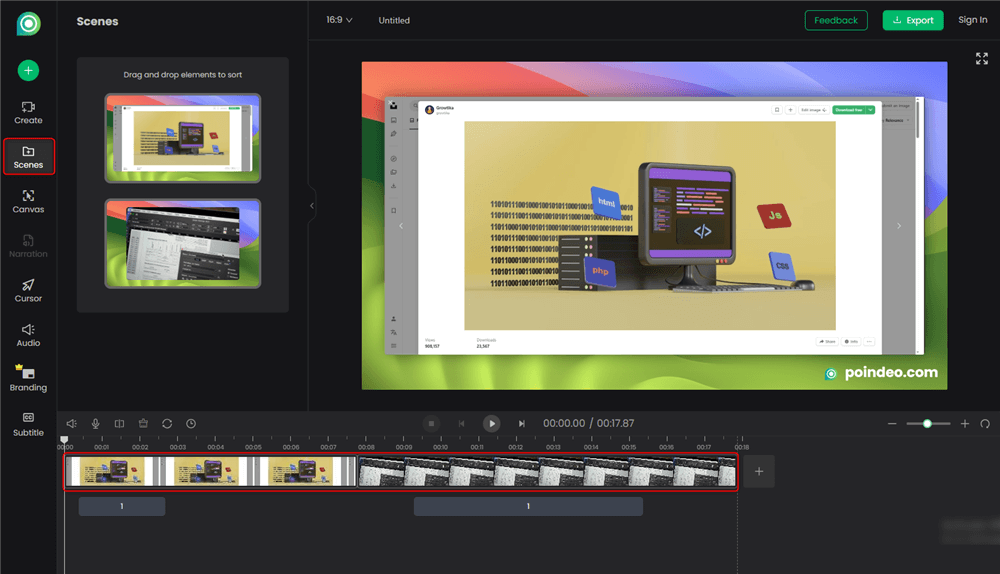
Import to Poindeo: Import your clips. Because Poindeo offers structured editing, you can drag and rearrange your segments like slides until the narrative flows perfectly.
Step 2: Add Clarity and Focus (Day 24 PM)
Apply Click Effects: Go through the core demo section (15-45s). With Poindeo, ensure every significant action button or input field is marked with the "Click Highlight" feature. This is the single most important technique for Product Hunt video clarity.
Set Focal Points: Use the zoom function to highlight complex charts or crucial UI details. For example, when you show a successful output, zoom in to capture the user’s excitement.
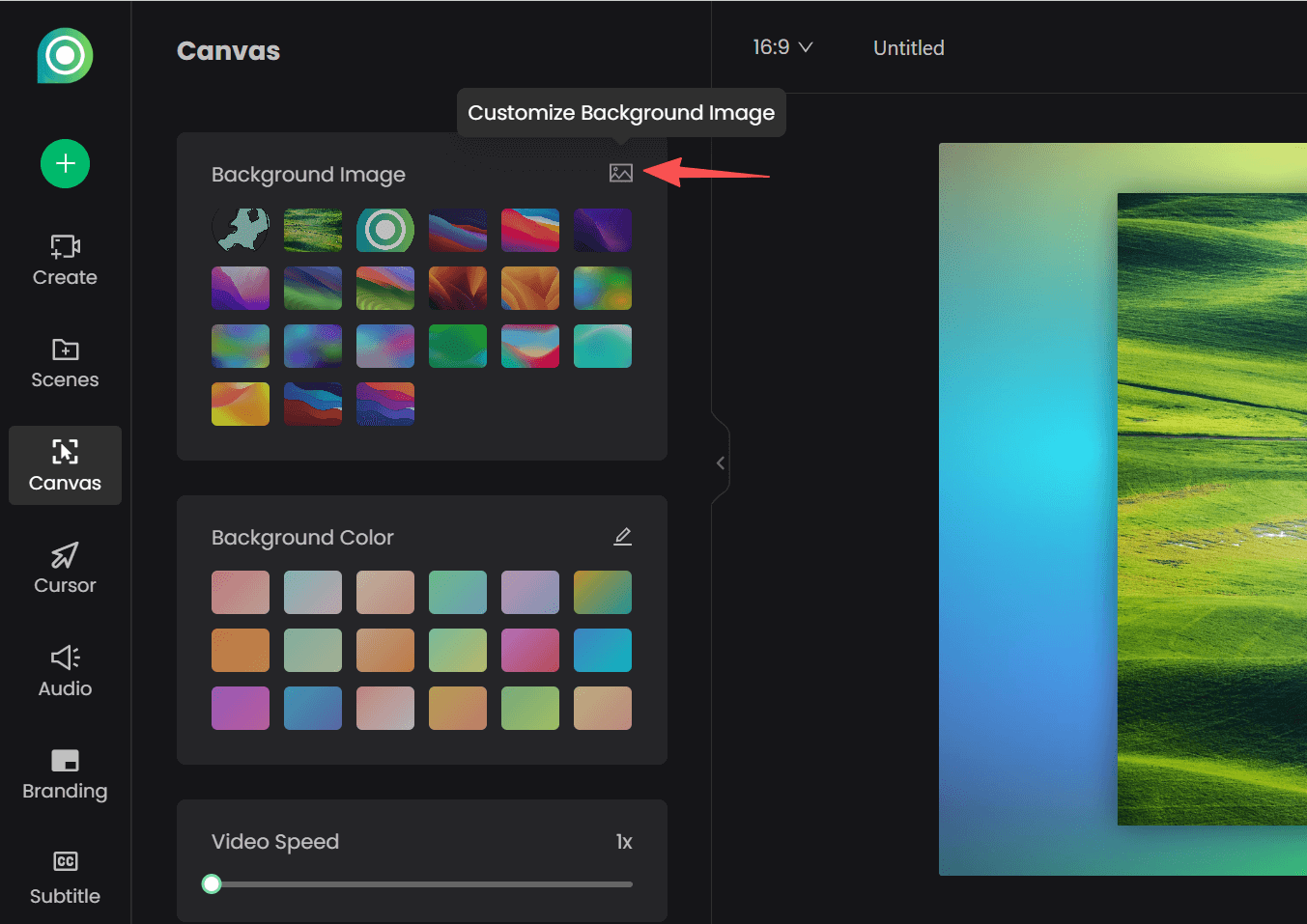
Visual Branding: Add a professional background to your screen captures using the platform's features, ensuring your video maintains a sleek, branded look.
Step 3: Finalize and Deploy (Day 25 AM)
- Audio and Music: Add a clean, motivational, royalty-free background track.
- Final Polish: Confirm the video length is under 60 seconds (the sweet spot for Product Hunt engagement).
- Export & Upload: Export your video and upload it directly to YouTube (since Product Hunt requires a YouTube URL). Be sure to also export a clean MP4 for your landing page and social channels. For lightweight visuals, create a GIF version as well—perfect for email sequences, launch teasers, and quick previews where users may not play a full video.
By using Poindeo, you cut down days of complex editing into hours of focused demo creation, allowing you to dedicate your precious pre-launch time to community engagement and audience building.
Day 26-28: The Pre-Launch Email Blast
Send an email to your waiting list.
- Subject: "We are launching in 48 hours (and here is your discount)"
- Body: Remind them of the specific time. Include a countdown timer GIF. Reveal the "Launch Day Special" (e.g., 30% off for 24 hours).
Day 29: The "Maker’s Manifesto"
Write the first comment you will post on your Product Hunt page. This is called the "Maker's Comment."
- Explain why you built this.
- Be vulnerable. Share the struggle.
- Ask for feedback.
Video Option: Record a "face-to-camera" version of this manifesto to post on Twitter/X the day before launch.
Day 30: Launch Day Execution
The Schedule (PST Timezone):
- 12:01 AM: Product Hunt page goes live.
- 12:05 AM: Post your "Maker Comment."
- 12:10 AM: Email your list: "We are live! Click here."
- 12:15 AM: DM your "Launch Squad" with the direct link.
- 12:30 AM - 11:59 PM: Reply to every single comment.
Asset Comparison: GIF vs. Video
Product Hunt allows both, but when should you use which?
| Feature | GIF | Video (MP4/WebM) |
| Best Use Case | Email Newsletters, Quick Social Replies, Logo Thumbnails | Main Launch Trailer, Landing Page Header, Tutorials |
| Audio | No | Yes (Crucial for explaining complex concepts) |
| File Size | Heavy (can be 10MB+ for short clips) | Light (Efficient compression) |
| Quality | Lower (limited color palette) | HD / 4K Crisp |
| Autoplay | Yes (Always loops) | Platform dependent (Usually requires click) |
| Poindeo Support | Yes (One-click export) | Yes (Optimized for Web) |
Recommendation: Use Video for your main asset to convey quality. Use GIFs for your logo and for embedding inside your emails, where video player support is spotty.
The 30-Day Summary Checklist
Phase 1: Foundations (Days 1-7)
- Define the "Visual Hook" (MLVP).
- Record 3x vertical teaser videos.
- Create Lead Magnet (PDF/Resource).
- Set up Product Hunt "Upcoming" Page.
Phase 2: Distribution (Days 8-14)
- Execute "Feature Drop" (3x social posts).
- Join 2-3 relevant subreddits/communities.
- Set up Email Welcome Sequence (with GIF).
- Draft list of potential "Hunters" or supporters.
Phase 3: Engagement (Days 15-22)
- Publish "Deep Dive/Behind the Scenes" video.
- Send personal video DMs to recruit "Launch Squad."
- Collect 3+ Beta User testimonials.
- Create a "Wall of Love" graphic.
Phase 4: Launch (Days 23-30)
- Edit and finalize the Main Launch Trailer. (Priority!)
- Schedule "48 Hours to Go" email.
- Write "Maker's Comment."
- LAUNCH DAY: Post, Email, DM, Reply.
Conclusion
Building an audience is effectively "compound interest." Every video you post, every email you collect, and every reply you send adds up. By the time Day 30 arrives, you won't be shouting into a void; you'll be launching to a room of people waiting for you to open the doors.
However, remember that in the fast-paced world of Product Hunt, clarity is king. If users can't understand what your product does in 5 seconds, they will scroll past.
Don't let complex video editing software slow you down. You are a developer, not a filmmaker.
Ready to start Phase 1?
Try Poindeo for free today and create your first "Zoom-in" teaser in less time than it takes to deploy a commit. Your audience is waiting to see what you've built.