
Every day, dozens of new products launch on Product Hunt. At 12:01 AM PST, the race begins. By 9:00 AM, the winners are usually clear. The top 5 products capture approximately 80% of the day’s traffic, leaving the remaining 40+ products to fight for scraps.
Why do so many promising tools, apps, and platforms fail to break into that top tier?
It is rare because the product itself is defective. The most prevalent cause is a poor launch strategy. Too many Makers spend months developing brilliant features only to launch with static, uninteresting screenshots, a generic description, and a "cold email" strategy that influential hunters ignore.
In today's attention economy, a conventional checklist is inadequate. To win on Product Hunt, you must use a Visual-First Pre-Launch Strategy.
This comprehensive guide will coach you through the exact steps to distinguish your launch from the crowd. We'll go over how to visually build anticipation, how to identify and secure a top Hunter using video pitches, and how to leverage Poindeo, the browser-based video creation tool that turns screen recordings and static assets into dynamic, professional visuals, to produce attention-grabbing launch assets.
Phase 1: The "Visual-First" Product Hunt Pre-Launch Strategy
Traditional pre-launch checklists focus on email collection, but "Waitlist Fatigue" is real. In an attention economy, your competitive advantage is Visual Impact. The human brain processes images 60,000 times faster than text, so your visuals are your first—and often only—impression.
Building a Dynamic Teaser Page
Most Makers upload a static logo to their "Upcoming" page, which is a wasted opportunity. To boost "Notify Me" conversions, embed your product's "Aha Moment" directly into the visuals.
- The Strategy: Instead of a static image, use a high-quality, looping GIF as your hero image.
- Identify the Hook: Find the feature that makes users say "Wow."
- Zoom In: Record the action and zoom in on key interactions so users don't have to squint.
- Export as GIF: Create a 10-15 second loop to prove the product works instantly.
"Building in Public" with Video
Text updates like "Just fixed a bug!" are forgettable. To build a fan base, bring them into the development room.
- Practical Tip: Record 30-second "Micro-Demos" of new features.
- Keep it Authentic: Don't script it. Use screen recording with a webcam to connect the Maker to the Product.
- Highlight Details: Use zoom effects to showcase subtle UI animations or polish. These details signal quality to early adopters.
By launch day, your audience shouldn't just know about your product; they should feel like they've been part of its growth.
Further Reading: Product Hunt vs. Indie Hackers >
Phase 2: How to Find and Secure a Top Hunter
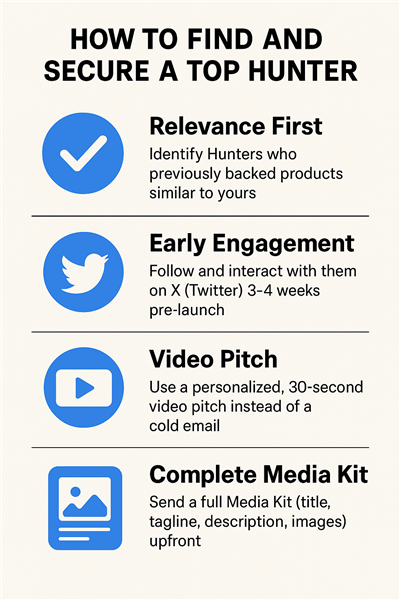
A "Hunter" is a community member who submits your product to Product Hunt. While you can hunt your own product (and many successful Makers do), securing a Top Hunter offers two distinct advantages:
- Social Proof: A stamp of approval from a respected community member signals to users that this product is worth their time.
- Notification Reach: When a top Hunter submits a product, their followers (often thousands of active users) receive a notification.
However, finding a Hunter is not about spamming the top 50 people on the leaderboard. It’s about Relevance and Relationship.
Step 1: Defining Your "Ideal Hunter"
A common mistake is chasing Hunters solely based on follower count. A Hunter with 50,000 followers who specializes in Crypto web3 projects is useless if you are launching a No-Code design tool. Their audience won't care, and the algorithm will punish your low click-through rate.
Relevance > Reach. You need a Hunter whose audience aligns with your product.
- Analyze Competitors: Go to Product Hunt and search for products similar to yours (e.g., "Video Editor," "Screen Recorder," "Design Tool"). Look at who hunted the most successful ones.
- Check the "M" vs. "H": Look at the product page. Next to the Maker ("M"), is there a Hunter ("H") listed? Click their profile.
- Audit Their History: Do they hunt regularly? Are they still active? Do they typically hunt paid SaaS tools or free fun apps?
Step 2: Search Tactics (Hack the System)
Once you have an idea of the type of person you need, it's time to find specific names.
Use Product Hunt Search: Simply search for keywords related to your niche.
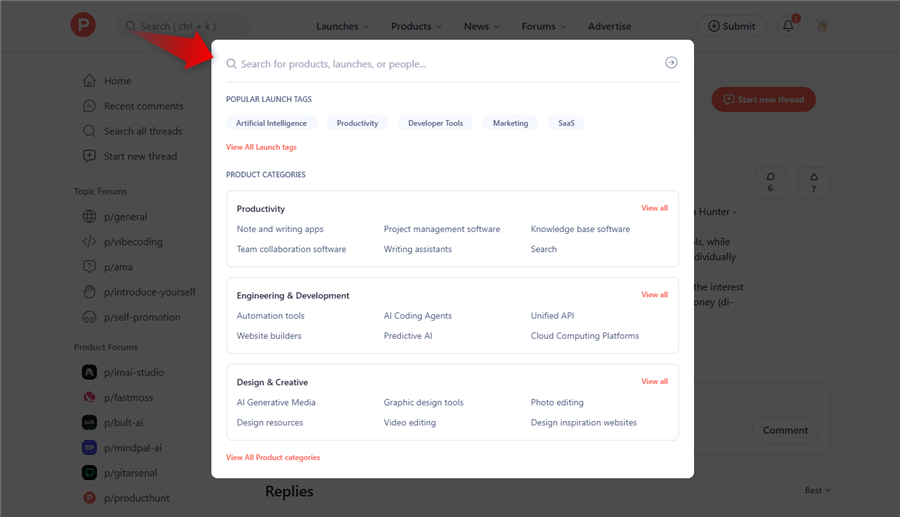
Upvote Bell: This third-party tool lists the top hunters. Filter them, but cross-reference with their recent activity.
Twitter/X Advanced Search: Many Hunters live on X. Search for: (your niche) "Product Hunt" -filter: links. This shows people discussing launches in your niche without just spamming links.
Step 3: The Ultimate Weapon: The Video Pitch
This is the most critical part of this guide. Top Hunters receive dozens—sometimes hundreds—of emails and DMs a week asking for a hunt. 99% of them look like this:
"Hi [Name], I built a new tool. It's the Airbnb for X. Can you hunt us? Here is the link."
This is boring, impersonal, and easy to ignore. To secure a top Hunter, you need to disrupt their pattern. You need a Visual Video Pitch—created efficiently using a screen recorder like Poindeo.
Why Video Works
A short, personalized video pitch is effective because:
- Proves Authenticity: It confirms you are a real human, not a bot.
- Shows Respect: It respects their time (it’s faster to watch a video than to read a long email).
- Demonstrates Immediately: It showcases the product’s value right away.
How to Create the Perfect Hunter Pitch with Poindeo
You don't need a film crew. You need 5 minutes and your browser running a tool like Poindeo.
- The Setup (Using Poindeo): Open Poindeo. Select the "Screen + Camera" mode to record your face and the product interface simultaneously. Have your product open in a clean tab.
- The Script (The "60-Second Hook"): Follow this time structure:
- 0-5s (The Personal Hook): "Hey [Hunter Name], I’ve been following your hunts on [Competitor App] and love your taste in creator tools. I made this specifically for you."
- 5-20s (The Problem & Solution): "I noticed most video editors are too complex for quick social clips. So I built [Product Name]. Watch this..."
- 20-50s (The Magic Trick - The Poindeo Advantage): Perform one core action in your tool. Crucial: Use Poindeo's Zoom Effect here to focus on the key UI action. Don't let them miss the cursor. Zoom in on the output and show the result instantly.
- 50-60s (The Ask): "I'd be honored if you took a look. No pressure to hunt, but I think your audience would love this. Let me know what you think!"
- The Polish (Using Poindeo): Edit the recording directly in Poindeo. Trim the awkward silence at the start and end. Add a simple text overlay with your product name.
- The Delivery: Send this video via DM or email with the subject line: "Made a 60s video for you (re: [Product Name])".
Phase 3: Creating Viral Launch Assets
You’ve secured your Hunter. Now you need to prepare the assets for the big day.
The Product Hunt algorithm heavily weighs engagement (upvotes, comments) and click-throughs. Your assets determine whether a scroller stops or continues to move. To simplify the process of creating these high-impact assets, tools like Poindeo are essential.
Poindeo is a browser-based video creation tool that turns static assets—such as images, screenshots, and PDFs—and simple screen recordings into dynamic, professional-looking videos without the steep learning curve of traditional video editors. Its key features are built around speed and visual clarity:
- In-Browser Editing: Record, edit, and export everything without downloading software, enabling rapid iteration.
- Precision Zoom: Unique capability to zoom in (200%-300%) on specific UI actions, ensuring key features are visible even in small formats (like GIFs and Shorts).
- Multi-Segment Stitching: Easily combine multiple short recordings (Problem, Solution, Result) on a timeline with transitions.
- Text Overlays: Simple tools for adding clear, readable text to videos, making them effective even when viewed without sound.
- Format Versatility: Easily export in various formats (GIF, landscape video, vertical video) for multi-channel distribution.
1. The Thumbnail (The Click-Through Gatekeeper)
Your thumbnail is the most important asset you will create. It is the only thing people see on the homepage list.
Static is Dead. Go GIF. Product Hunt allows GIF thumbnails. A moving thumbnail acts like a beacon on a static page. But be careful—a chaotic, flashy GIF looks like spam.
How to make a "Classy" GIF Thumbnail with Poindeo:
Step 1. Select the recording area. Set your Poindeo recording area to a square ratio (e.g., 600x600 or 240x240).
Step 2. Record the Action: Record a simplified version of your UI, focusing on just one button being clicked and one result happening (do not show the entire dashboard).
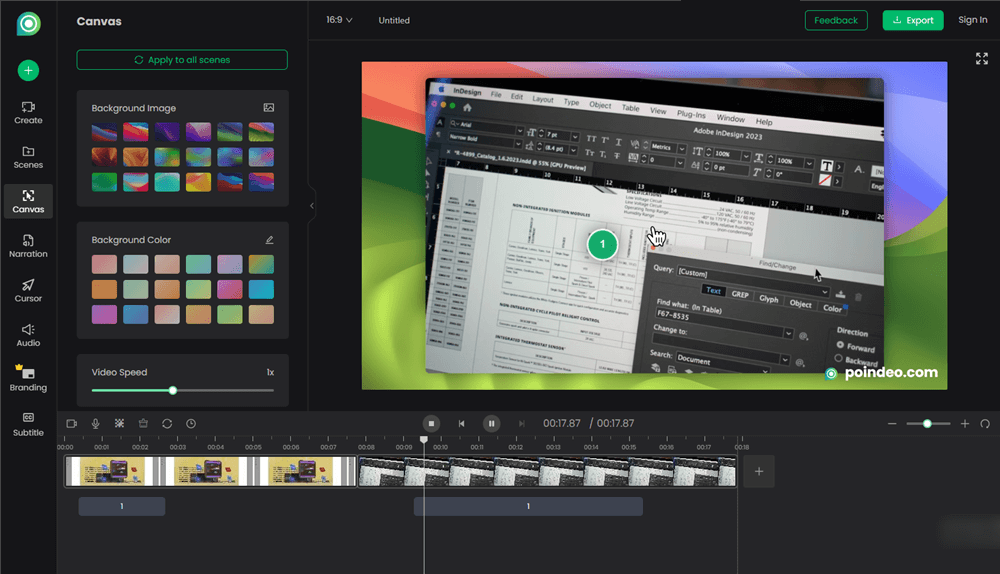
Step 3. Use the Zoom Feature: Extensively use the Zoom feature to zoom in 200% or 300% on the action so it remains legible, especially on small mobile screens.
Step 4. Ensure the Loop: Ensure the start and end points match as closely as possible for a seamless, continuous loop.
2. The Demo Video (The Conversion Engine)
Once they click your thumbnail, the first thing they see is the media gallery. The first item should be a video.
Best Practices for Product Hunt Demo Videos:
Step 1. Record and Segment: Record different segments of your tool using Poindeo:
- Segment 1 (The Problem): Show the "old way" (grayscale or slow).
- Segment 2 (The Solution): Show your tool (bright, fast, and zoomed in).
- Segment 3 (The Result): Show the final export or outcome.
Step 2. Stitch Segments: Stitch the different recorded segments together on the Poindeo timeline.
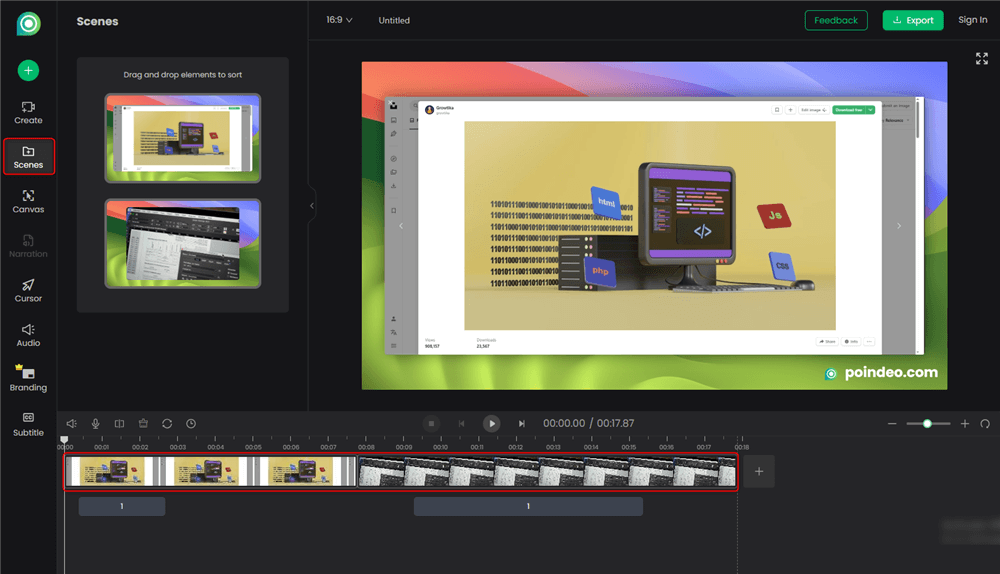
Step 3. Add Transitions: Add transitions between the segments.
Step 4. Add Text Overlays: Add clear text overlays to explain what is happening, ensuring the video makes sense without sound.
Step 5. Optimize Duration: Edit the final video to be under 60 seconds (ideally 40-50 seconds).
Poindeo is uniquely suited for this because it allows you to edit in the browser. You can record different segments of your tool, stitch them together on the timeline, and add transitions.
- Segment 1 (The Problem): Show the "old way" (grayscale or slow).
- Segment 2 (The Solution): Show your tool (bright, fast, zoomed-in).
- Segment 3 (The Result): Show the final export or outcome.
3. The Maker's Welcome Video
In the first comment on your launch page, you (the Maker) should introduce the product.
Instead of just text, include a link to a "Welcome" video hosted on YouTube or Loom. Seeing the founder’s face builds immense trust. It transforms the transaction from "buying software" to "supporting a person."
Phase 4: Launch Day Execution
The day has arrived. It’s 12:01 AM PST. Your Hunter has posted the product. Now what?
The "First Hour" Golden Rule
The first hour is critical for the algorithm. You need velocity.
- Activate Your Inner Circle: Send that email to your waitlist. DM your friends. Ask them to support the launch. Note: Do not ask for "upvotes" directly, as this violates PH rules. Ask for "feedback" and "support."
- The Maker Comment: Post your prepared comment immediately. Introduce the team, explain the "why," and ask a specific question to encourage comments (e.g., "Do you prefer feature A or B?").
Social Media Blitz (The Content Repurposing Strategy)
Drive external traffic using your pre-recorded demo video, repurposing it with Poindeo for each channel:
| Channel | Poindeo Action | Content Style |
| X/Twitter | Crop to a square/4:5 ratio. | Post a thread on the launch journey. |
| TikTok/Reels/Shorts | Change canvas to 9:16 (vertical). | The Zoom feature keeps the key action visible. |
| Post the full landscape video. | Use a professional case study caption. |
The Follow-Up
Reply to every single comment on Product Hunt. Be gracious, be fast, and be helpful. If someone reports a bug, record a 10-second video showing them a workaround or thanking them for the find. This level of visual support often turns a critic into a superfan.
FAQs: How to Find and Secure a Top Hunter
How do I find a top Hunter for my product?
To find a top Hunter, focus on relevance over fame.
- Identify Niche Fit: Find Hunters who previously backed products similar to yours.
- Engage Early: Follow and interact with them on X (Twitter) 3–4 weeks pre-launch.
- Send Video Pitch: Use a personalized, 30-second video pitch instead of a cold email.
- Provide Assets: Send a full Media Kit (title, tagline, description, images) upfront.
What is the best time to launch on Product Hunt?
The Product Hunt day resets at 12:01 AM PST. It is best to schedule your launch for exactly this time (or have your Hunter submit then) to maximize the 24-hour window for collecting upvotes. Tuesday, Wednesday, and Thursday are generally the highest traffic days, but also the most competitive.
Do I really need a Hunter? Can I hunt for my own product?
You can absolutely hunt your own product! Many "Maker-Hunted" products reach #1 Product of the Day. A Hunter helps with initial reach via notifications, but your product's visuals, copy, and your own community promotion are far more important factors for success.
How long should a Product Hunt demo video be?
Aim for 40 to 60 seconds. Users have short attention spans. Get straight to the value proposition in the first 5 seconds. Use tools like Poindeo to speed up slow sections and zoom in on key actions to keep the video dynamic.
What are the dimensions for a Product Hunt thumbnail?
The recommended size is 240x240 pixels, but you can upload up to 600x600 for better quality. Product Hunt supports JPG, PNG, and GIF. Using a GIF thumbnail is a highly effective strategy to draw attention to your listing.
Conclusion
Winning on Product Hunt is not about luck. It is about preparation, psychology, and presentation.
You are competing for attention in a crowded room. A text-heavy strategy is like whispering. A Visual-First Strategy is like walking into that room and putting on a spectacular light show.
By using tools like Poindeo, you can create professional, zoomed-in, high-impact visuals without needing a degree in video editing or expensive software.
Don't let your hard work get buried because of poor presentation. Take control of your narrative visually.